Curvature of the Mind

Thoughts from a Recreational Physicist

Archives for June 2011

Something I’m playing around with.

This is something that I just stumbled onto while working on something else. I’ve taken a quick break from the atomic orbital viewer. I’m trying to make the IFS fractals more visually interesting. One approach is to create Mandelbrot versions of the IFS fractals which should break up the uniformity. Instead of showing one image that is an exact copy of parts of itself, each part of it would be locally similar to a different fractal. The images I’ve been creating up until this point have all been analogs of Julia sets. I’m hoping the Mandelbrot versions will turn out more interesting. It also opens up the potential of higher dimension renderings as Mandelbrot sets exist in parameter space, not the actual fractal space.

Voronoi and a trip far afield

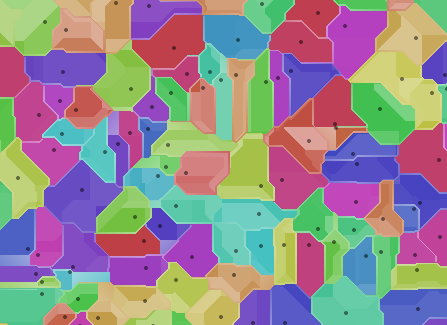
In order to do that, I need to estimate the “basin of attraction” for each mapping in the fractal. A voronoi diagram is one way to do that. I started out just generating standard simple diagrams as a test. Sometimes images are just the best way to see what is going on. Using a very simple algorithm, I just iterated through a list of random points and colored pixels based on the closest one. That meant I kept track of the minimum distance and the matching index. Which lead to renders of that distance, followed by the sine of the distance.

Now that I’m looking at alternate renderings, I figured the easiest way to find the borders of domains was to track the second closest point as well and whenever the distances between first and second point were equal you were on a boundary. That looked ok, but lead to some artifacts.

Now that I was collecting this info, I figured I’d try to do something else with it, so I applied it to the alpha channel and switched over to the taxicab metric just for fun.

Related Images:

I never knew it looked like that


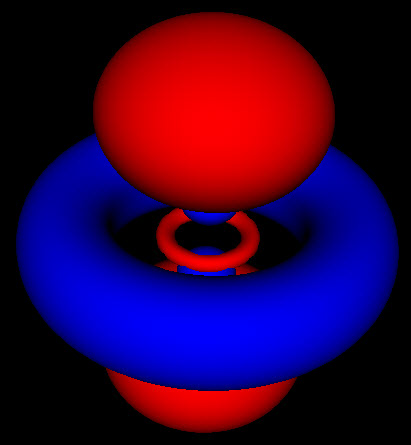
These are all images of the same electron orbital. The doughnut or torus shows the electron rotating around the central point in the orbital plane. In the standard terminology this has principal quantum number 2, which represents the energy level of the electron.

The azimuthal quantum number is 1. This represents how much of the energy of the electron is stored in rotating around the atom; in other words, it’s angular momentum.

The magnetic quantum number is 1 as well. This represents an electron spinning as fast as it possibly can given the momentum it has in a circular orbit.

The next image shows a standing wave mode of this orbital. This is where things get kinda weird. This mode is formed by two rotating waves moving in opposite directions. the (2,1,-1) and (2,1,1) modes.

This is where things get interesting. These wavefunctions are complex functions spread out through space. One of the basic assumptions of quantum mechanics is that the square of this wavefunction represents the probability that the particle will be found at that location. The 3 pictures above represent the same probability distributions sampled at different levels of detail.

Because these are probabilities there isn’t any fixed way to map them to a particular shape. The level set for finding an electron within a region 50% of the time can look much different than that for 80% or 99%. For the simple spherical distributions, they do look the same, but for higher energy wavefunctions the shapes get more complicated.

My first attempt to view these functions was a simple addition of probabilities, which produced images like the one to the left. This image corresponds to the 4th image up top. As you can see this looks flat, and you can’t make out the links between the red blobs, the connections between them or the shape of anything. This is a somewhat more accurate rendering of the function, but it lacks all the features like shading, and solid form that our brain uses to give us clues about depth and shape.

On the other hand, the solid rendering hides the blurriness of these methods. Looking at the 3 pictures up top, you can’t tell by just looking at an individual picture how they are connected and what probability cutoff they represent. Looking at just static pictures is even harder.

So now that I’m no longer limited to the static shots on the web, or in a book, I’m seeing how these functions fit together. While the azimuthal part of the wave function is just a scaled cosine function, the interaction with the other dimensions of the wave function produce two different kinds of nodes. The first are the blue nodes that keep the simple blob shape even at very low thresholds. The other is the red nodes that have a dimple in them when they try to connect across the center of the torus at low thresholds. None of this helps me with calculations, but I feel like I have a much clearer view of what’s going on.

None of these pictures holds the whole story. Each one just shows a different part of the puzzle, and I’m sure there are many other ways to highlight many of the other features of these functions.

Related Images:

Release often

The atomic orbital viewer is now on it’s third release. The first one was just the basic blurry transparent renderer, using just the rotating basis from the standard derivation from undergraduate physics classes. The second release added an option to view standing wave functions instead of the rotating as the standing wave functions are the ones most commonly shown in physics and chemistry textbooks, as well as Wikipedia.

This new and much improved version has a new solid renderer. It shows images with the closest fidelity to those seen elsewhere. Some of the things I learned from this version:

  • It is hard to picture transparent ethereal glowing clouds. In order to get the rotation of the cloud version looking the way I thought it should, I ended up reversing the x rotations and the way points receded into the background.
  • I wasn’t able to picture the shape of these constant surfaces from the glowing versions at all. There is a lot more going on with these shapes then I imagined.
  • Static pictures from text books have not done these things justice. There is no definitive shape for each of these wave functions. As you scale the threshold value, the surfaces bend and warp into new interlocking shapes.
  • WebGL is new and isn’t documented that well. It took me a while to understand why my shaders weren’t working the way I thought they should. Loops in WebGL are all fixed length and you can’t exit from them early. Putting a return function in a loop compiles, but it doesn’t work. I had to go old school with my shaders and use extra flag variables to simulate the exits.
  • I thought old school printf/alert debugging was hard. The only output from a fragment shader is the color of the dot on the screen. I had been outputing a range of values in what I thought was the 0 to 1 range. However most of the results were > 1 so it just showed flat regions. I finally figured out doing sin(x)*sin(x) would give me bands I could work with. Fract(x) is another option for that as well.
  • WebGL is crazy fast for this stuff. I put together an initial implementation of this in javascript and 2d canvas, but it had a noticeable render time even on chrome. Switching over to the WebGL version, and it renders smoothly in the blink of an eye with very little optimization or thought about it.

I’ll be adding some more overview posts soon. The new renderer is generating new insights. I’ll also be adding more models like the harmonic oscillator, and start demoing some superpositions.

Related Images: