 This is just a quick little demo using the mask API call. It ended up looking a little nicer than I thought it would, so I figured I’d show it.
Random dynamics on a triangular grid
 I’m dipping my feet into random and monte carlo methods and wanted to try it out with a triangular grid after finding a few beautiful images on pinterest. I’m just picking grid elements at random and then swaping the values with an adjacent tile.
Everything random moves things around, random plus not separating matching tiles creates small clusters, picking the direction based on the tile color creates big groups in those directions. Rules based on sums just move things around randomly.
I haven’t found any rules to create large scale clusters yet, or create repetitive structured patterns, but I’m still looking. I’ll try some more ising, or changing value instead of swapping rules and see what I can do with those. I would still think that there should be some kind of local clustering rule though.
Related Images:
Fractal Drawing Tool – Users Guide
Fractal Designer
I’m trying to put together some instructions and add some context for the tool I’ve been using to create the fractal images on the site. I’ve made some updates to the usability and features, adding the ability to upload an image to imgur. This is only the second rev, and the first of more tools to come.

The Controls
This is just a quick collection of instructions on how to use the HTML5 fractal drawing application I have on this site. First thing first, the tool draws images based on the colored control points on the screen. You can drag them around with your mouse to create different shapes.
For even more control, each control point has a set of sliders that control how it adds to the image. The first slider controls the amount of rotation you get around the control point. The second controls how much the control point shrinks the image while it copies. The third which is the most complicated, controls how much the image is squished into a line.
The best way to get a feel for how the images change is to dig right in and start manipulating the graphics. Please let me know what you think on the comments to this post. Things are pretty bare right now, but I have plans to add other renderers that I’ve demoed with pictures, and color for sure. I’ve kept it to black and white as I’m trying to build my skills with more complicated images.
Related Images:
Nothing fancy: Winter bubbles
My inspiration board on pinterest has been filling up, so I wanted to take a few hours to whip up something quick. I really liked the simplicity of winter trees. I didn’t want to do a direct copy, so this is my riff on the composition.

Winter Bubbles
Related Images:
Islands of stability
This time I mapped the pendulum angle and time onto the surface of a cone to create a tunnel effect. For the parameter space I’m looking at, you can really see how the paths will converge for a while and then suddenly diverge wildly.

Related Images:
Sensitive dependence on initial conditions
This next demo highlights the butterfly effect. These curves show the same pendulum as before, this version has the time axis wrapped around the center of the screen and the exponential of the angle as the radius. All the pendulums start at a very similar initial position and for some driving functions they diverge wildly and others they all stay pretty close.


Related Images:
More envelopes
This time I’m not taking up all of the screen. Still working with polynomials and trigonometric functions.

Related Images:
Another image
 I just like this one!
Related Images:
Rough and Random page
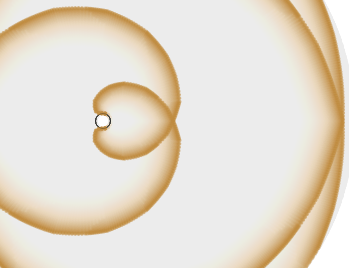
I’ve had this sitting on my computer for a while and thought I’d publish it rather then just leave it sitting there. This simulates a pulse of light expanding out like my compression wave examples. This time however, we are looking at a pulse of light expanding in the vicinity of a black hole. Rather than expanding out in a circular wave pulse, it wraps around the hole and circles back to the original location traveling around the hole forever.
I’m still trying to wrap my head around what this implies. Most General Relativity texts cover light cones tipping over at various distances from the black hole, and particular light paths including distances where light orbits the hole. The code is pretty rough and ugly right now, but is a fun little application of solving differential equations in javascript.
Related Images:
A Mandelbrot Image I’ve been working on.
